This article separates marketing from evidence when comparing gaming chairs and ergonomic office chairs. You’ll learn what makes a chair truly supportive, how to match features to your body and work habits, when a gaming chair can suffice, and how to set up an ergonomic desk to prevent back, neck, and wrist pain. Practical buying, setup, and maintenance guidance follow.
Why ergonomics matters for office workers
Working at a desk in 2025 often feels like a physical endurance test. Most of us spend the majority of our waking hours in a chair. This lifestyle has created a massive health crisis in the modern workforce. Industry health surveys indicate that up to 80 percent of office workers in the United States experience musculoskeletal discomfort. These issues primarily impact the back, neck, and shoulders. We are seeing a significant rise in these complaints as more people move to permanent remote or hybrid setups. Recent data suggests that approximately 35 percent of the workforce now operates in a hybrid or fully remote capacity. This shift has increased ergonomic risks because home offices rarely match the regulatory standards of professional corporate environments.
The Reality of Desk Related Pain
Lower back pain is the most frequent complaint among desk workers. A 2023 report highlights that 26 percent of office employees experience this pain daily. It is not just the back that suffers. Neck pain prevalence rose 15 percent between 2019 and 2023. Shoulder discomfort now impacts 40 percent of hybrid workers. These are not isolated incidents. They are part of a pattern of physical strain caused by sedentary behavior. When we look at gaming chairs vs. office chairs, we have to consider how these designs address these specific pain points. Many popular chairs focus on aesthetics rather than the actual science of spinal support.
Economic and Productivity Consequences
The impact of poor ergonomics goes beyond physical discomfort. It carries a heavy financial burden for both employees and employers. Musculoskeletal disorders cost United States employers an estimated 13.45 billion dollars annually in direct costs. Productivity losses are even higher. Back pain alone causes 7.2 million lost workdays annually. When workers are in pain, they cannot focus, and efficiency drops. The total economic loss from productivity drops related to pain reached approximately 61 billion dollars in 2023. Investing in the right setup is a financial necessity for remote teams and office managers alike.
| Pain Area | Prevalence Rate | Annual Economic Impact |
|---|---|---|
| Lower Back | 26 percent | 30,000 dollars per case |
| Neck and Shoulders | 40 percent | 15,000 dollars per case |
| Wrists and Hands | 25 percent | 10,000 dollars per case |
The Mechanics of Injury
Most office injuries do not happen because of a single accident. They are the result of cumulative microtrauma. This concept describes how thousands of tiny stresses build up over time. If you sit with poor posture for more than four hours a day, you are creating micro stresses in your joints and tissues. Within two years, 50 percent of these cases turn into chronic pain. Prolonged sitting for more than six hours a day raises the risk of back pain by 40 percent according to OSHA guidelines. The damage accumulates silently until it becomes a persistent problem that requires medical attention.
Environmental Factors and Posture
Several specific factors contribute to these injuries. Monitor height is a major culprit. NIOSH research indicates that screens placed above eye level cause 30 percent more forward head posture. This puts extreme pressure on the neck muscles. Keyboard and mouse placement also play a role. Suboptimal placement leads to 22 percent higher wrist extension angles. This increases the risk of carpal tunnel syndrome. Many people use chairs that do not allow for proper adjustment. This forces the body to adapt to the furniture instead of the furniture supporting the body. You can see more about these design differences in this video about gaming vs office chairs which explains why certain labels can be misleading.
The Role of Remote and Hybrid Work
The transition to remote work has complicated the ergonomic landscape. Many employees work from kitchen chairs or sofas. These surfaces offer zero support for the natural curve of the spine. Surveys show that hybrid work models have increased musculoskeletal complaints by 20 percent since 2021. Remote workers often lack the specialized equipment found in corporate offices. They also tend to take fewer breaks. This leads to longer periods of static sitting. Without the right guidance, these workers are at a much higher risk for long term injury.
Goals of Ergonomic Intervention
The primary goal of ergonomic intervention is to reduce pain and improve long term health. We want to create a workspace that supports the body in a neutral position. OSHA meta-analysis shows that proper ergonomic setups can reduce the incidence of musculoskeletal disorders by 32 percent. This involves more than just buying a new chair. It requires a total look at how the monitor, keyboard, and seat work together. A good setup improves comfort and increases productivity by 13 percent. It allows workers to stay focused on their tasks without being distracted by physical strain. Early prevention is the most effective way to avoid the high costs of healthcare and lost work time. Understanding the good and bad of different chair types is the first step in building a healthier work environment.
Anatomy of a chair what makes a chair ergonomic
The human spine is not a straight line. It follows a natural S-curve. The lower part of this curve is called lumbar lordosis. It typically arches inward between 30 to 50 degrees. When you sit for eight hours, gravity works against this curve. A chair only earns the ergonomic label if it actively maintains this shape. This requires a technical understanding of how different components interact with your musculoskeletal system.
Lumbar Support Mechanics
Effective lumbar support must be adjustable in both height and depth. The support should sit between 6 to 10 inches above the seat pan. This placement targets the L1 through L5 vertebrae. Depth is equally important. The support should protrude 1 to 3 inches to fill the gap in your lower back. Fixed lumbar cushions often fail because they do not account for different torso lengths. If the support is too high, it pushes on your ribcage. If it is too low, it flattens the sacrum. Both scenarios lead to disc compression. You want a mechanism that matches the 40 degree lordosis curve of a healthy spine.
Seat Height and Leg Alignment
The seat height range should fall between 16 to 21 inches for most adults. To find your ideal setting, stand in front of the chair. The highest point of the seat should be just below your kneecap. When seated, your feet must rest flat on the floor. Your knees should maintain an angle between 100 to 110 degrees. This position prevents pressure on the popliteal arch behind the knees. If the chair is too high, it restricts blood flow to the lower legs. If it is too low, it forces the pelvis to tilt backward. This creates a slouching posture that strains the lower back.
| User Height | Recommended Seat Height |
|---|---|
| 5 feet 0 inches to 5 feet 4 inches | 16 to 17 inches |
| 5 feet 5 inches to 5 feet 9 inches | 17 to 18 inches |
| 5 feet 10 inches to 6 feet 2 inches | 18 to 19 inches |
| 6 feet 3 inches and taller | 19 to 21 inches |
Seat Depth and Thigh Support
Seat depth is the distance from the backrest to the front edge of the seat. Most ergonomic chairs offer a depth between 16 to 18 inches. You need a clearance of 2 to 4 inches between the edge of the seat and the back of your knees. This gap is roughly the width of three fingers. Proper depth ensures your weight is distributed across the entire seat pan. If the seat is too deep, you will pull away from the backrest. This loses all lumbar support. If the seat is too shallow, your thighs carry too much weight. This leads to fatigue in the hip flexors.
Seat Pan Material and Design
The seat pan should feature a waterfall edge. This means the front of the cushion curves downward by 1 to 2 inches. This design reduces thigh compression by 25 percent. Material choice affects long term comfort. High resiliency foam with a density of 2.5 to 4 pounds per cubic foot is the standard for durability. It provides support without bottoming out. Mesh is an alternative that offers 90 percent better breathability. However, mesh can sometimes create pressure points at the frame edges. The seat pan should also allow for a slight tilt. A forward tilt of 5 degrees can be helpful for intensive typing tasks.
Backrest and Recline Mechanisms
The backrest needs to be at least 18 to 20 inches tall. This height supports the shoulder blades. The most advanced chairs use a synchro tilt mechanism. This system reclines the backrest and seat at a 2 to 1 ratio. When you lean back 10 degrees, the seat only tilts 5 degrees. This keeps your feet flat on the floor. It opens the hip angle to reduce pressure on the abdominal organs. A recline range of 90 to 135 degrees is ideal for dynamic sitting. You should look for a tilt tension adjustment. This allows you to set the resistance between 20 to 50 pounds based on your body weight.
Adjustable Armrests
Armrests should be 4D adjustable. This means they move in height. They move in width. They move in depth. They pivot. They should sit 7 to 11 inches above the seat pan. Your shoulders should remain relaxed. Your elbows should stay at a 90 to 110 degree angle. The width adjustment is vital. It should span 18 to 22 inches to match your shoulder width. If armrests are too wide, you will flare your elbows. This causes strain in the trapezius muscles. If they are too narrow, they restrict movement.
Headrest and Base Stability
Headrests are not mandatory for standard office work. They benefit about 15 percent of users. These are usually people with tall statures or those who recline often. A good headrest adjusts 3 to 5 inches in height. The chair base must be a 5 star design for stability. It should have a diameter of 27 to 30 inches. Caster type depends on your floor. Use 2.5 inch polyurethane casters for carpet. Use soft rubber casters for hardwood. This prevents the chair from sliding too easily or scratching the surface.
Value Beyond the Brand
Adjustability matters more than the price tag. A premium brand is a poor investment if the chair does not fit your specific measurements. Look for BIFMA certification. This ensures the chair survived 100,000 cycles of testing. High quality ergonomic chairs often come with a 5 to 12 year warranty. Trial policies are essential. You should test a chair for at least 30 days. It takes this long for your body to unlearn poor posture habits. For more details on choosing between styles, you can read about Ergonomic vs Gaming Chair – Which One Should You Really Buy to see how these technical features compare in the real world.
How gaming chairs differ from ergonomic office chairs
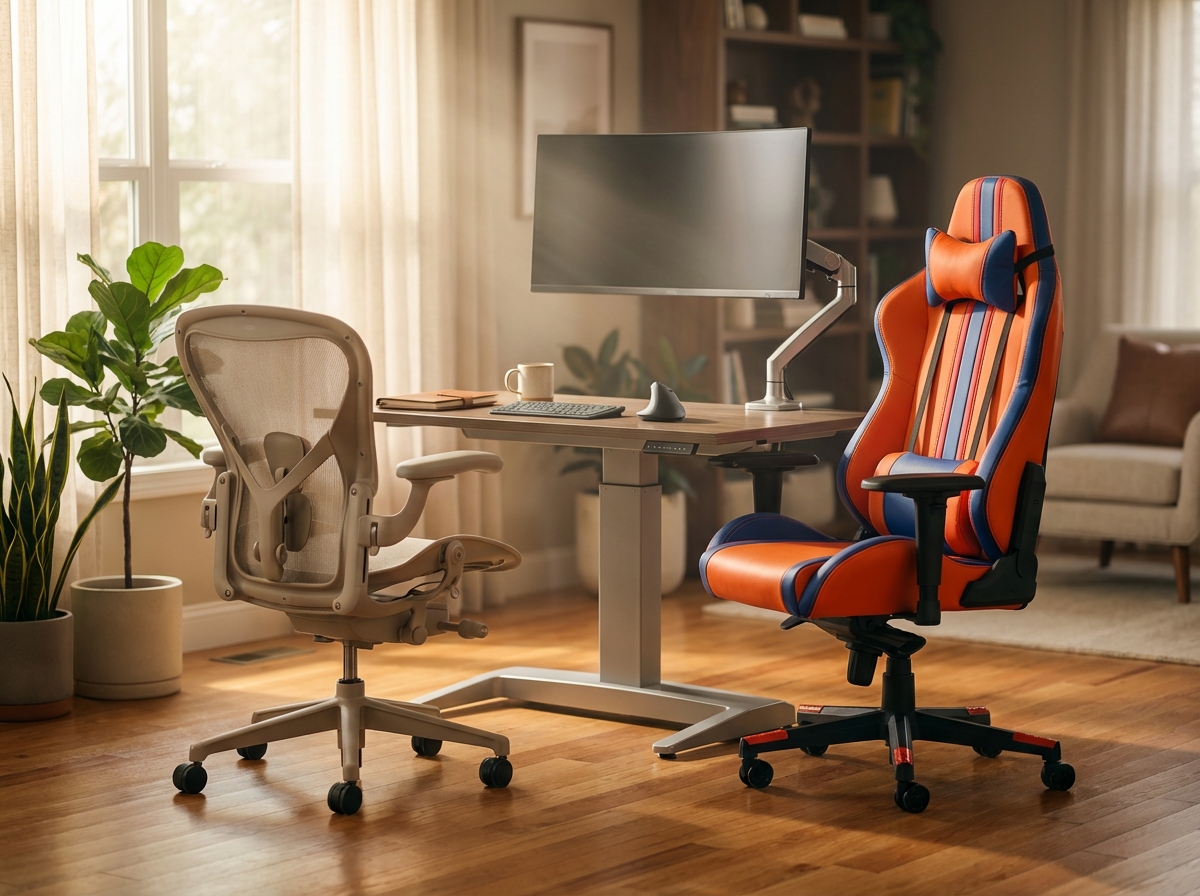
The visual appeal of a gaming chair is hard to ignore. These seats often feature bright colors, racing stripes, and large logos that look impressive in a home office or on a stream. However, the design philosophy behind these chairs usually prioritizes a specific look over long term physical health. Most gaming chairs are modeled after bucket seats found in race cars. This design serves a purpose in a vehicle where side bolsters keep the driver from sliding during sharp turns. At a desk, these bolsters are often restrictive. They can pin the shoulders forward and limit the natural movement of the legs. This restriction often leads to a rounded posture that contributes to the 60 percent of neck strain cases seen in desk workers today.
The materials used in gaming chairs also differ significantly from professional ergonomic options. Many gaming models use dense foam covered in synthetic PU leather. While this looks sleek, it lacks breathability. After several hours of work, heat buildup can become uncomfortable. The cushions are often either too thin or excessively firm, which fails to distribute body weight evenly. In contrast, ergonomic office chairs utilize high resiliency foam or breathable mesh. These materials are designed to support the body for eight or more hours. Mesh specifically allows for 90 percent better airflow than synthetic leather, which helps maintain a neutral body temperature during a long shift.
The Science of Support and Movement
Lumbar Support Differences
One of the most critical differences lies in how these chairs handle the lower back. About 70 percent of gaming chairs rely on a removable lumbar pillow. These pillows are often non adjustable in height and tend to shift several inches during an hour of use. This lack of stability means your spine rarely receives consistent support. Ergonomic office chairs typically feature integrated, multidirectional lumbar support. This system allows you to adjust both the height and the depth of the curve to match your natural lumbar lordosis. When the chair matches the natural 30 to 50 degree curve of your spine, it reduces disc pressure. Mismatched support can increase that pressure by 50 percent, leading to the chronic back pain that affects 26 percent of US desk workers daily.
Tilt Mechanisms and Dynamic Sitting
The way a chair reclines impacts how your body moves throughout the day. Most gaming chairs use a simple 1 to 1 recline ratio. When you lean back, the seat and the backrest move together at the same angle. This can lift your feet off the floor and put pressure on the back of your thighs. Professional ergonomic chairs use a synchronous tilt mechanism with a 2 to 1 ratio. This means the backrest reclines twice as far as the seat. This movement keeps your feet flat on the ground and maintains a healthy angle at the hips. It encourages dynamic sitting, which is the practice of moving slightly while you work. Staying in one fixed position for more than six hours raises back pain risk by 40 percent, so a chair that facilitates movement is essential.
Comparing Key Features
| Feature | Gaming Chair Standard | Ergonomic Office Chair Standard |
|---|---|---|
| Lumbar Support | External strap on pillow | Integrated and height adjustable |
| Seat Edge | Flat or bolstered edge | Waterfall design to reduce pressure |
| Tilt Type | Simple center tilt or 1 to 1 recline | Synchronous tilt with 2 to 1 ratio |
| Armrests | Basic height or 2D adjustment | 4D adjustment (height, width, depth, pivot) |
| Seat Depth | Fixed depth | Adjustable for different thigh lengths |
Seat Design and Circulation
The front edge of the seat pan is another area where design choices impact health. Ergonomic chairs almost always feature a waterfall seat edge. This slight downward slope reduces pressure on the back of the knees. This design choice can reduce popliteal pressure by 40 percent, which is vital for maintaining healthy circulation in the legs. Gaming chairs often have flat seats or even upward curving bolsters at the front. These can compress the thighs and lead to numbness or discomfort during long sessions. Proper seat depth adjustment is also rare in entry level gaming chairs. Without it, you cannot ensure the 2 to 4 inches of clearance behind the knee that is necessary for optimal blood flow.
Making the Right Choice for Your Workflow
When a Gaming Chair Works
There are scenarios where a gaming chair is an acceptable choice. If your desk work is limited to less than four hours a day, the ergonomic shortcomings are less likely to cause chronic issues. They can also be a viable option for those on a strict budget between 150 and 300 dollars. Some hybrid models from reputable brands now include better lumbar systems and adjustable armrests. If you enjoy the aesthetic and only use the chair for short duration gaming or light admin tasks, a high quality gaming chair can suffice. However, if you have preexisting back pain, these chairs are often a poor fit and can make the condition 30 percent worse due to the fixed pillow systems.
Value and Long Term Investment
When evaluating cost, it is helpful to look at the lifespan of the product. A typical gaming chair lasts between three and five years before the foam compresses or the synthetic leather begins to peel. A premium ergonomic chair often carries a warranty of 10 to 12 years. Brands like Steelcase or Herman Miller test their chairs for 100,000 cycles to ensure durability. While the initial price of 800 to 1,500 dollars is higher, the cost per hour of use is often lower than a budget gaming chair. You can find more details on these differences in this guide on Ergonomic vs Gaming Chair features. Before buying, always check for a trial period of at least 30 days. It takes time for your body to adapt to a new sitting surface, and a generous return policy is the best insurance against a poor fit.
Choosing and setting up the right chair and desk for your body
Selecting a chair requires more than just looking at a price tag or a color scheme. You need to treat it like a piece of medical equipment because it supports your spine for thousands of hours every year. Before you start browsing websites, get a measuring tape and record your physical dimensions.
Essential Body Measurements
Measure your hip width while sitting down. Most adults need a seat width between 17 and 20 inches to accommodate their hips comfortably. If you choose a chair with high side bolsters, like those found on many racing style seats, ensure they do not pinch your thighs. Next, measure your thigh length from the back of your hip to the back of your knee. This number determines the seat depth. You need a gap of two to four inches between the edge of the seat and your knees to prevent circulation issues. Finally, measure the height from the floor to the underside of your desk. You need at least 24 inches of clearance for your knees to move without hitting the desk frame.
Prioritizing Adjustable Features
If you work at a desk full time, your requirements are much higher than someone who sits for an hour a day. You should prioritize a chair with a synchronous tilt mechanism. This feature allows the backrest to recline at a higher ratio than the seat, which keeps your feet flat and your torso open. Look for 4D armrests that adjust in height, width, depth, and angle. These allow you to support your forearms regardless of how wide your shoulders are.
Buying Strategy and Policies
Never buy a chair based on aesthetics alone. A flashy design often hides cheap foam that will flatten within months. Try to visit a showroom to test different models. If that is not possible, only buy from companies that offer a 30 to 90 day trial period. Your body needs at least two weeks to adjust to a new ergonomic setup. Check the warranty details carefully. Reputable brands like Steelcase or Herman Miller provide 12 year warranties that cover the frame and the mechanisms. Avoid chairs with warranties shorter than three years as they often use lower quality materials. You can find detailed comparisons in this ergonomic vs gaming chair comparison to see which brands hold up over time.
The Step by Step Setup Routine
Once your chair arrives, you must configure it to your specific proportions. Start with the seat height. Adjust it so your feet are flat on the floor and your knees form a 100 to 110 degree angle. If your desk is too high and your feet dangle, you must use a footrest to avoid pressure on your lower thighs.
Upper Body Alignment
Set your armrest height so your shoulders remain relaxed. Your elbows should sit at a 90 to 110 degree angle while your forearms rest parallel to the floor. Position your keyboard and mouse on the same level. This prevents you from reaching upward or downward, which protects your wrists from strain. Your wrists should remain in a neutral, straight position while typing. If you feel your wrists bending back, lower the keyboard or use a slight negative tilt.
Monitor and Lumbar Placement
Place your monitor directly in front of you about 20 to 28 inches away. The top of the screen should be at or slightly below your eye level. This prevents you from tilting your head up or down, which is a leading cause of neck pain. Finally, adjust the lumbar support. It should sit in the natural curve of your lower back, roughly four to six inches above the seat pan. It should feel like a firm but comfortable nudge that prevents your spine from slumping into a C shape.
Enhancing the Workstation
| Component | Ideal Setting | Benefit |
|---|---|---|
| Monitor Height | Top at eye level | Reduces neck strain |
| Elbow Angle | 90 to 110 degrees | Prevents shoulder fatigue |
| Knee Gap | 2 to 4 inches | Maintains circulation |
| Monitor Distance | 20 to 28 inches | Reduces eye strain |
Using Accessories Effectively
If you use a sit-stand desk, do not stand all day. The goal is movement. Transition between sitting and standing every 30 to 60 minutes. Use a monitor arm to achieve the perfect height and depth that fixed stands cannot provide. For those with persistent wrist discomfort, an ergonomic split keyboard or a vertical mouse can help maintain a more natural forearm position. These tools are discussed further in this Haworth guide on workstation configuration.
Daily Movement and Maintenance
Even the best chair cannot fix the problems caused by total stillness. You need to incorporate microbreaks into your routine. Every hour, take two minutes to move. This simple habit can reduce physical fatigue by up to 40 percent.
- Chin Tucks. Pull your head straight back as if making a double chin. Hold for five seconds and repeat ten times to reset your neck posture.
- Shoulder Rolls. Roll your shoulders up, back, and down in a circular motion ten times to release tension in the trapezius muscles.
- Seated Twists. Hold the side of your chair and gently rotate your torso to one side. Hold for 30 seconds and repeat on the other side to mobilize the lower back.
- Wrist Stretches. Extend one arm with the palm facing up. Use your other hand to gently pull your fingers down toward the floor. Hold for 30 seconds per arm.
Long Term Maintenance
Keep your chair in good condition to ensure it continues to support you. Clean the upholstery weekly. If you have a PU leather chair, use a damp cloth with mild soap. Check the bolts and tilt tension once a year. Screws can loosen over time, which leads to wobbling and instability. If the seat cushion compresses more than 20 percent or you can feel the hard frame beneath the foam, the chair has reached the end of its life. Most high quality ergonomic chairs last seven to ten years, while budget gaming chairs often need replacement after three years.
Common questions answered
Choosing a chair involves navigating a lot of marketing noise. Most people feel overwhelmed by the choice between a flashy gaming seat and a clinical office chair. This section addresses frequent concerns with data from recent ergonomic studies and workplace safety reports, focusing on practical alternatives and testing methods.
Can I use a gaming chair with a standing desk?
You can, but it presents challenges. Gaming chairs often have a larger footprint and a less stable recline mechanism. This can make the chair feel wobbly when you are transitioning between sitting and standing. You also need to ensure the chair has lockable casters. Without them, the chair may roll away when you try to sit back down. Many office workers find that the bulky design of gaming chairs interferes with the legs of a standing desk. If you use a standing desk, a chair with a synchronous tilt is better for maintaining a neutral posture during transitions.
Are there affordable ergonomic alternatives?
You do not need to spend 1,500 dollars for good support. There are solid options in the 300 to 500 dollar range. Brands like SIHOO or Branch offer models with BIFMA certification and essential adjustments. These chairs provide better long term value than a budget gaming chair. If you have persistent pain despite using a good chair, consult an ergonomist or a clinician. They can identify if the issue is your equipment or your habits.
How can I test a chair remotely?
Start by measuring your body. You need your hip width and your thigh length. Compare these to the seat pan dimensions listed on the manufacturer website. Check independent reviews that show the chair in use by people of your height and weight. Some brands now offer augmented reality apps that let you see the chair in your workspace. If you are unsure, prioritize brands with a 30 day return policy. A 15 percent higher return rate for gaming chairs suggests that many people find them uncomfortable after the initial purchase.
What should I look for in a warranty and trial policy?
A 30 day trial period is the minimum you should accept. Your body needs about two weeks to adapt to a new chair. If you feel more pain after the first week, the chair might not be the right fit. For the warranty, look for at least five years on the frame and three years on the mechanical parts. Premium brands like Steelcase offer 12 year warranties. This covers almost everything from the casters to the pneumatic cylinder. Avoid chairs that only offer a one year warranty as they are not built for long term use.
Comparison of Chair Specifications
| Feature | Ergonomic Office Chair | Standard Gaming Chair |
|---|---|---|
| Adjustments | 8 to 12 points | 4 to 6 points |
| Tilt Type | 2:1 Synchro-tilt | 1:1 Fixed recline |
| Lumbar Support | Built-in adjustable | Removable pillow |
| Lifespan | 7 to 10 years | 3 to 5 years |
| Warranty | 5 to 12 years | 1 to 3 years |
Final takeaways and action plan
The evidence gathered throughout this guide points to a single conclusion. Your chair is a tool for health rather than a piece of decor. While gaming chairs dominate social media with bright colors and racing aesthetics, they often fail the most basic ergonomic tests for long term use. Most office workers and remote teams are better served by chairs designed for the human spine. These chairs prioritize the natural inward curve of the lower back. They allow for the micro movements that keep your discs hydrated. Choosing a chair based on marketing hype leads to the musculoskeletal disorders that now affect a vast majority of office workers in the United States.
The Priority of Fit
A chair must match your specific body measurements to be effective. A chair that is too deep will press against the back of your knees and restrict circulation. A chair with a backrest that is too short will not support your shoulder blades. You should look for a seat pan that leaves two to four inches of space between the edge and your inner knee. This ensures your weight is distributed across your thighs without causing pressure points.
The Necessity of Adjustability
Static chairs are the enemy of a healthy back. You need at least seven points of adjustment to customize the fit. This includes seat height, seat depth, and lumbar height. It also includes tilt tension and armrest positions. High quality ergonomic chairs often feature a synchro tilt mechanism. This moves the backrest at a two to one ratio with the seat. It allows you to recline while keeping your feet flat on the floor. This movement is essential for reducing the pressure on your spinal discs during an eight hour workday.
The Role of Peripherals and Movement
Even the best chair cannot fix a poor desk setup. Your monitor must sit at eye level to prevent the forward head posture that causes neck strain. Your keyboard and mouse should be at a height that keeps your wrists in a neutral position. Beyond the hardware, movement is your best defense against pain. Standing for a few minutes every half hour can reduce reported pain by fifty percent. You should pair your chair with a sit stand desk or a footrest if your feet do not reach the floor comfortably.
Five Step Action Checklist
- Measure your sitting height and thigh length to find your required seat dimensions.
- Test any potential chair for at least thirty minutes to check for pressure points.
- Adjust the lumbar support so it sits firmly in the natural curve of your lower back.
- Pair your chair with a monitor arm to ensure the screen stays at eye level.
- Move your body by setting a timer to stand or stretch every thirty minutes.
Buying Decision Rules
| Factor | Minimum Requirement |
|---|---|
| Budget Threshold | Four hundred dollars for a new ergonomic chair with full adjustments |
| Trial Length | Thirty days of home or office use to allow for body adaptation |
| Warranty Minimum | Five years on the frame and three years on the mechanical parts |
| Certification | BIFMA tested for durability and weight capacity up to three hundred pounds |
Troubleshooting Decision Tree
| Symptom | Immediate Action | When to Seek a Clinician |
|---|---|---|
| Lower back pain | Increase lumbar depth and check if feet are flat on the floor | If pain persists for more than two weeks or radiates down legs |
| Numbness in hands | Lower armrests and ensure wrists are not resting on sharp edges | If tingling continues after work hours or causes grip weakness |
| Neck and shoulder tension | Raise monitor height and pull the chair closer to the desk | If you experience frequent headaches or restricted neck movement |
| Leg swelling or heaviness | Reduce seat depth and use a footrest to relieve thigh pressure | If you notice persistent swelling or discoloration in the lower legs |
Investing in your workspace is an investment in your future mobility. It is easy to be swayed by the “gaming” label or the promise of a chair that looks like a cockpit. However, the data shows that these designs often prioritize style over the complex needs of the human body. You can find more details on these differences in this guide on Ergonomic vs Gaming Chair. If you want to understand the mechanical differences in how these chairs recline, you can read about Gaming Chairs Vs Office Chairs. Your health is worth more than a flashy aesthetic. Choose the chair that supports your spine and commit to a routine of movement. Your body will thank you years from now when you are still working and living without chronic pain.
Sources
- Ergonomic vs Gaming Chair – Which One Should You Really Buy … — Confused between an ergonomic vs gaming chair for long hours? This guide breaks down key features to help you choose the best chair.
- Gaming Chairs Vs. Office Chairs: Everything You Need To Know — So if you're a gamer, you'll generally want to look for adjustable armrests, the ability to recline, headrests, and a full backrest that's …
- Gaming Chair vs Office Chair: Which One Is Best? – OdinLake — Gaming Chair vs Office Chair: Key Differences · 1. Design and Appearance · 2. Padding and Comfort · 3. Adjustability · 4. Ergonomics · 5. Material · 6 …
- Gaming Chairs Vs Office Chairs: The Good, Bad, and the Ugly — One fundamental difference between office and gaming chairs is the way that they recline. Almost all ergonomic chairs use a synchro-tilt …
- Gaming vs Office Chairs: Don't Fall For The "GAMING" Label — 69% OFF on Steelcase Chairs & MORE* Ends 2/28! https://btodtv.com/3VINFmf *2025 Office Chair Comfort Tier List CHEAT SHEET* …
- Best Gaming Chair in 2025 – Tom's Hardware — A good gaming chair does more than just add personality to your battle station — it provides support for your back, hips, and shoulders (and …
- Best gaming chair in 2025: I've tested a ton of gaming … – PC Gamer — Best gaming chair in 2025: I've tested a ton of gaming chairs and these are the seats I'd suggest for any PC gamer · Secretlab Titan Evo review …
EMPTY